The File Encryption Software
Home > Products > Screenshots / How to > Windows Command Line
How to automate file encryption from Windows Command Line
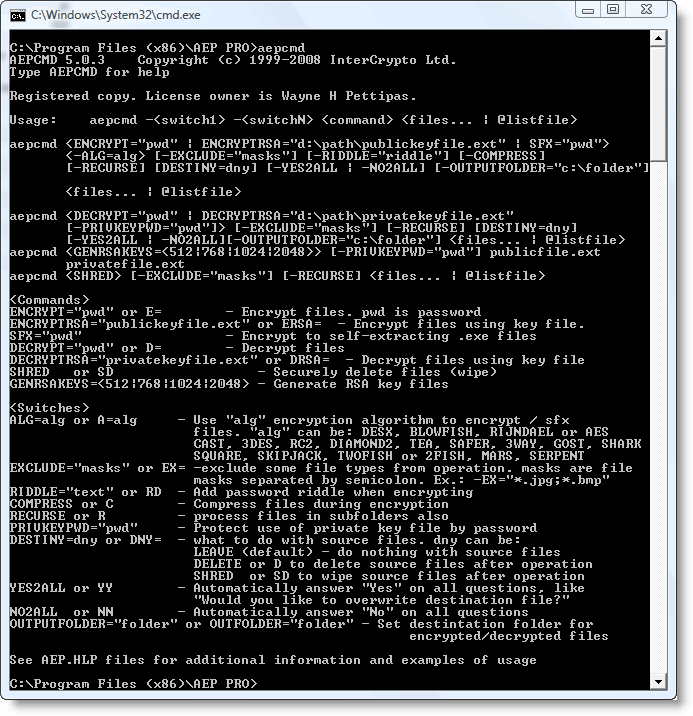
Click this image to see full sized one
The command line tool of Advanced Encryption Package is used to automate command line encryption, i.e. recurrent file encryption tasks.
AEPCMD.EXE, command line tool is used to automate such tasks and it can be programmed to perform complex tasks with a single script.
Automating recurrent encryption tasks provides two advantages. First, performing tasks automatically saves time. Secondly, automated the process guarantees that they are performed exactly the same way every time thus making it possible to implement company policy and minimize the risk of error.
AEPCMD supports the following operations:
- Symmetric file encryption and decryption: AES, Twofish, Blowfish, Serpent and other algorithms.
- Asymmetric file encryption and decryption: RSA with keys 512 bit, 768 bit, 1024 bit, 2048 bit
- Secure file deletion
- Creating self-extracting encrypted file
- Generating RSA keys
Additionally:
- AEP can process whole folder, not just single file. In this mode AEP enumerates all files in the specified folder and processes them. AEP can works recursively, i.e. encrypt/decrypt/shred files in folder and its subfolders
- AEP understands file masks. I.e. you can set what file types to process in the specified folder. Moreover you can set additional list of file mask for excluding files from operation. Additionally, AEP understand file list (with masks) in the text file and can load the list from such file.
- AEP can delete/shred processed files automatically after encryption/decryption. There is special additional command line switch. For example, you can encrypt all *.jpg files in the c:\my_pictures folder into *.jpg.aep files and then securely delete source *.jpg files. In this mode AEP will not delete any source file, it there was error during encryption/decryption.
- You can set different folder for output files
- You can add password tip to every file to be encrypted. This tip then can be read in main aep program. It could be helpful if you do not remember used password.
- It is possible to add cmd line switch allowing file compression during encryption
- AEP can ask user what to do in conflict situations, for example when you try to decrypt file and when the destination file already exists. Buy you can set special command line switches: yes2all, no2all.
- AEPCMD always skip already encrypted files. So, you can run batch script to encrypt all files in the specified folder regularly. Every time it will detect new files in the directory, then encrypt them, then delete source files.
- AEPCMD returns error codes as errorlevels. ErrorLevel is the special thing that can be analyzed in your script. For example AEPCMD returns 0 for all successful operations. And different error codes for different errors. So, for example, you can abort your script if aepcmd returns error code.
Self Defence Package
3 product bundle (CD Encryption + USB Encryption + File Encryption + Drive Encryption) at a special price
Subscribe to our Newsletter.
Get notified about new products releases, new significant updates of existing products. Be first to know about short season's discounts and special offers.
"Compatible with Windows® 10" software

Great tool to help make things just a little easier
Advanced Encryption Package Professional is a tool that can ease some of the pain of working with encrypted messages and files.


DOWNLOAD3000.com site has awarded AEP PRO by 5 stars award!